Last Session — A Quick Recap
- ✓for loops — do the same thing to every item
- ✓range(start, stop, step) — loop over positions
- ✓if / elif / else — let the program decide
- ✓break — stop the moment you’re done
…so you built a translator that reads a whole gene on its own:
seq = "ATGAAACGCGGCGTTTAA"
codon_table = {"ATG": "M", "AAA": "K", "CGC": "R",
               "GGC": "G", "GTT": "V", "TAA": "*"}
stop_codons = {"TAA", "TAG", "TGA"}

protein = ""
for i in range(0, len(seq) - 2, 3):
    codon = seq[i:i+3]
    if codon in stop_codons:
        break
    protein = protein + codon_table.get(codon, "?")

print(protein)        # MKRGV
Claudia's Next Problem
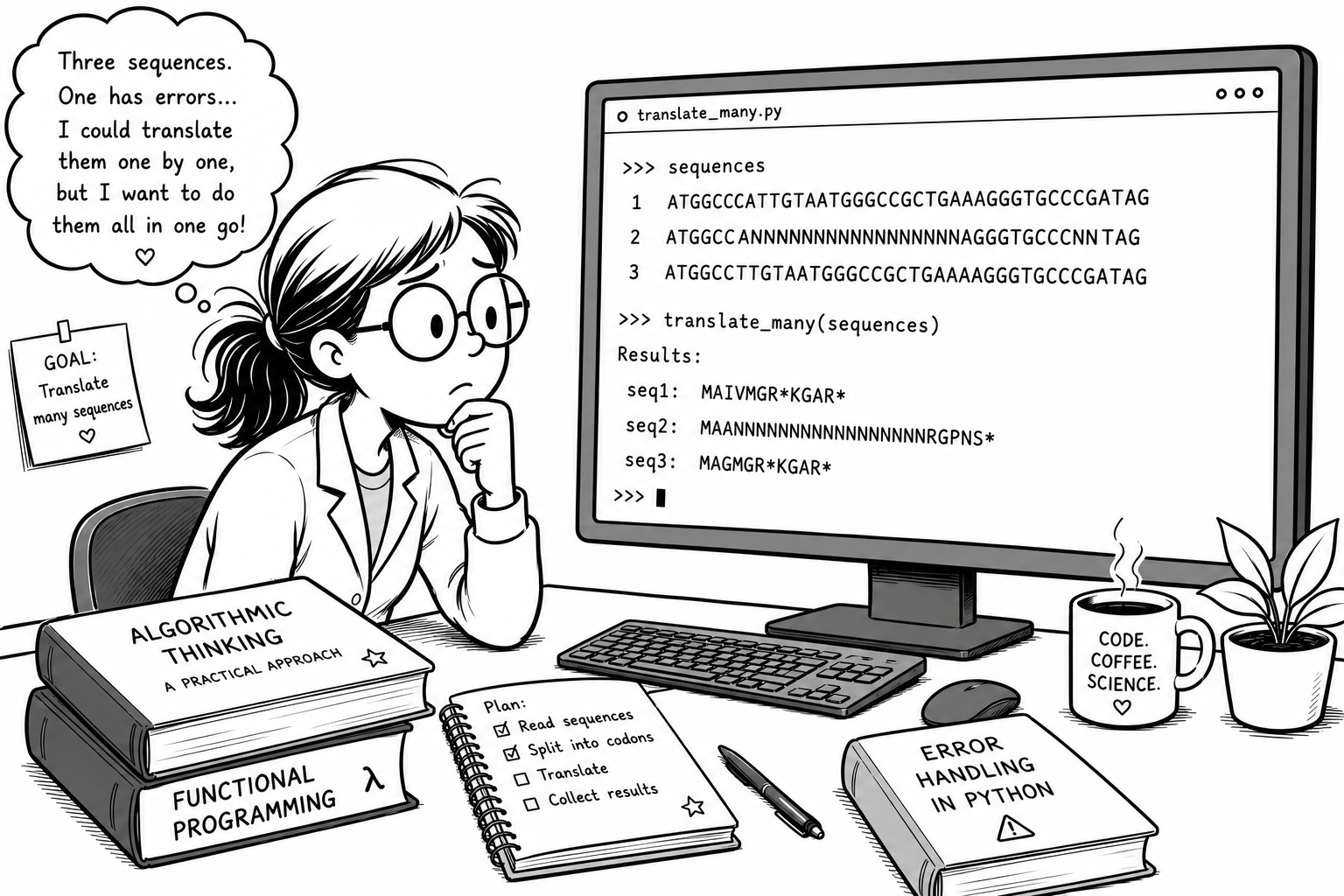
Your translator handles one sequence. Claudia has a folder of them. She could copy-paste the loop for each — seq1, seq2, seq3… — but she wants to do them all in one go.
Look at sequence 2 on her screen — it's full of Ns. Real sequencing data is like this. Her program didn't crash: it handed back MAANNNN…RGPNS* — something that looks like a protein and isn't.
A plan for the whole job · her translator packaged up so it runs on any sequence · and a program that says so when the data is wrong. Look at the books on her desk — that is today.
This Session — the Books on Her Desk
Claudia wants to translate many sequences in one go, and one of them is full of Ns. Three things get her there — and they're stacked on her desk. We'll take them in order.
“Algorithmic Thinking — A Practical Approach”
Break a problem too big to hold in your head into steps that each fit. Plan first, code second.
“Functional Programming”
Package each step and give it a name. Written once — works on every sequence in the folder.
“Error Handling in Python”
A program that quietly returns nonsense is worse than one that stops. Make it say so.
You Already Wrote an Algorithm
You worked out what had to happen, in order. Four steps, in plain English — no Python anywhere:
- 1I have a sequence
- 2I need to isolate the codons
- 3I need to match each codon to an amino acid
- 4I need to assemble them into a protein
That plan is an algorithm — a sequence of steps that turns what you have into what you want. The code came second.
…and then each step became code. Same colours:
The hard part was never the syntax. It was knowing which four things to do. That skill has a name, and it's what today is about.
You Already Do This at the Bench
The plan — what you think before any protocol exists:
- 1Lyse the cellssteps 1–2
- 2Get rid of genomic DNA and proteinsteps 3
- 3Isolate the DNA and wash itsteps 4–5
- 4Collect the pure DNA in a final buffersteps 6
The protocol — the steps that carry it out:
- 1Resuspend the pellet in 250 µl buffer P1
- 2Add 250 µl P2, invert 6×, leave ≤ 5 min
- 3Add 350 µl N3, invert, spin 10 min
- 4Apply the supernatant to the column, spin 1 min
- 5Wash with 750 µl PE, spin
- 6Elute in 50 µl EB
…buffers P1, P2, N3 — see p. 42
You thought in four goals, then wrote six steps. One goal can take two steps, or one. That's the same two levels as your translator: plan first, then code.
The protocol never re-prints the recipe for P1. It names it and points elsewhere — written once, used by every protocol in the book.
Break Down: the Other Strand
"Give me the reverse complement of this sequence." DNA is double-stranded — genes are read off both strands. Sounds like a real piece of software. Break it down first:
[::-1] from Session 2 · a dictionary lookup · the accumulator from Session 3. Nothing new. Breaking down turned "write a reverse complement" into three things you've already done.
Session 2 promised you'd build this one day. It took three steps:
Break it down, one step at a time
10,000 sequences in a list. Report the mean GC content of the ones that start with ATG. No code yet: first the plan, then the Python behind each step. There is no single right breakdown — but some steps are too big to be steps.
# 10,000 sequences in a list
seqs = ["ATGCGC", "TTGACA", "ATGAAT", "GCGCGC", ...]
Question 1 — One step
Which of these is one step — small enough to look up how to do?
Analyse the sequencesKeep only the sequences that start with ATGWork out the answerWrite the programQuestion 2 — The order
Which order of steps works?
Keep the ATG starters → GC of each → meanMean → GC of each → keep the ATG startersGC of each → mean → keep the ATG startersMean → keep the ATG starters → GC of eachQuestion 3 — Starts with ATG
Which test keeps only the sequences that start with ATG?
for seq in seqs:
    if ???:
atg_seqs.append(seq)seq[:3] == "ATG""ATG" in seqseq[3] == "ATG"seq[0] == "ATG"Question 4 — GC of each one
Work out the GC content of each one — which Python shape is that?
A for loop that appends each GC value to a new listOne if statementA dictionary lookupA single print()Question 5 — Report the mean
Which line gives the mean of the ATG starters?
# gc_values holds the GC % of the ATG starters only
sum(gc_values) / len(gc_values)sum(gc_values) / len(seqs)len(gc_values) / sum(gc_values)max(gc_values)Revision — From Plan to Code
Try this after the lecture. The plan from the quiz has three steps. Each one becomes a few lines of Python — filter, measure, summarise.
Chains Get Long — so package them in Functions
"What protein does the other strand code for?" — two steps you've already done, chained. Every line is familiar. But to change one thing, you must read all of it first.
seq = "ATGGTACGCTGGACTTTGTGG"

# reverse complement it
complement = {"A": "T", "T": "A", "G": "C", "C": "G"}
rc = ""
for base in seq[::-1]:
    rc = rc + complement[base]

# now translate it
protein = ""
for i in range(0, len(rc) - 2, 3):
    codon = rc[i:i+3]
    protein = protein + codon_table.get(codon, "?")

print(protein) # PQSPAYHSame sequence in, same PQSPAYH out. Each step from your breakdown becomes one named thing — now the code reads like the plan you wrote.
seq = "ATGGTACGCTGGACTTTGTGG"

rc = reverse_complement(seq)
protein = translate(rc)

print(protein)          # PQSPAYH
Your steps are now names. Someone can read the plan without reading the code — and translate() works on the next sequence, and the next, and on all 10,000 of Claudia's. Just like "buffer P1 — see p. 42".
One problem: reverse_complement and translate don't exist yet. Next: how to make a name mean something.
Packaging It Up — def
That chain did two separate things — flip the strand, then read the codons. Two things → two packages.
def, a name you choose, and a parameter in brackets — a placeholder for whatever you hand it. Colon, then the body indented underneath. Exactly like a loop.
print shows you a value. return gives it to you, so you can put it in a variable and use it — which is why translate(rc) works.
Look closely: not one line inside the loops changed. You moved the code you already wrote and gave it a name. That's all a function is.
Same sequence, same PQSPAYH — now in two named pieces:
The Simplest Function
That last slide was where we're heading. Let's build it from nothing. Here is the smallest function that exists — it takes nothing, gives nothing back, and just prints.
The word def, a name you choose, empty brackets, a colon — then the body indented underneath. You already know this shape: it's a loop, it's an if. Colon, indent, body.
This is the bit that catches everyone. def only teaches Python the recipe — it doesn't cook it. Look at the output: "nothing has happened yet" comes first, even though the function was written above it.
start_codon_report() — the brackets call it. Written once, called twice. Written once, callable ten thousand times.
Run it — then delete the two calls at the bottom and run again. Nothing happens:
Give It Something to Work On
A function that always does exactly the same thing isn't much use. Put a name inside the brackets and it can work on anything you hand it.
It's a placeholder — an empty box with a label. When you write def report(seq): you're saying: "whatever you give me, I'll call it seq while I work."
report("ATGGTACGC") — that string drops into the box called seq, and the body runs with it.
One function, two sequences, two answers — and you wrote the logic once. That is the entire reason functions exist.
Run it — then add a report() call with your own sequence:
Naming Functions
Same rules as variables. The one difference: a variable holds a thing, so it gets a noun; a function performs an action, so it wants a verb.
- ✓Same rules as variables — Session 1, all over again
- ✓Letters, digits, underscores — no spaces, no dashes
- ✓snake_case: reverse_complement, gc_content
- ✓Avoid Python words: list, print, sum…
translate(), reverse_complement(), count_codons() — each name says what the function does.
All four of these run. Only one tells you what it does:
- ❌def f(s):What is f? What is s?
- ❌def doStuff(s):camelCase — that’s JavaScript
- ❌def revcomp2(s):Why 2? Where’s 1?
- ✅def reverse_complement(seq):Reads like English
Python doesn't care — def f(x): runs perfectly. The name is for humans, and the human who'll be most confused by f is you, in six weeks.
Hand the Answer Back — return
So far our functions only printed. That's a dead end — you can read it, but your program can't use it.
It puts characters on the screen and that's it. Look at x — we tried to catch what show_length gave us and got None. Nothing came back. The 9 you saw was never yours to keep.
return hands the value out of the function so you can put it in a variable and keep working — y * 3 only works because y is really 9.
None — Python's word for "nothing here". When a variable is mysteriously None, a missing return is usually why.
Both print a 9 — but only one of them gives you the 9: 💡 A function with no return still gives you something back:
Two Parameters — and a Default
Separate parameters with a comma. They fill up in the order you pass them: codon_at("ATGGTACGC", 3) puts the sequence in seq and the 3 in position.
Give a parameter a value in the def line and it becomes optional. Say nothing and you get 0. It's a sensible answer to "what if they don't tell me?"
To read the second reading frame you edited the file — frame = 0 became frame = 1 — and re-ran everything. With a default, you just ask:
No editing. No re-running the whole script. Two proteins, two lines — because the thing that changes is now an argument, not a line of code you have to go and find.
Run it — the first call never mentions a position, and still works:
Why Bother? Readable · Reusable
Read this out loud: "reverse complement the sequence, then translate it." That's the plan you wrote on paper.
Three sequences or ten thousand — the loop body doesn't change. This is exactly what Claudia wanted: not one by one, but all in one go.
3 · Fixable — spot a bug in your translation? Fix it in translate(), once. Every sequence you ever run is fixed. Copy-pasted code has to be fixed everywhere you pasted it — and you will miss one.
Scroll past the definitions and look at the last three lines. Add a fourth sequence to the list and run again — nothing else needs touching. That is the whole point.
Say What It Does — docstrings
Reading your own code is often harder. In six weeks you will open this file, find reverse_complement(seq), and genuinely not remember whether it wanted DNA or RNA — or what it gave back.
A docstring says what goes in, what comes out, and what the function is for — in English, for a human. It is not a comment: Python keeps it.
Every help() you've ever run reads somebody's docstring. Write one and your function behaves like a real Python function — because now it is one.
A name says what. A docstring says what it expects — and that turns out to matter enormously when someone hands it a sequence full of Ns.
Run it — you never wrote a help page, but you have one:
Package the spaghetti, one step at a time
The Session 1 GC calculation, copy-pasted three times. Write it once as gc_content(seq) — with a docstring — and call it.
seq1 = "ATGCGTACGTAGGCTA"
gc1 = (seq1.count("G") + seq1.count("C")) / len(seq1) * 100
gc1 = round(gc1, 1)
print(f"seq1 GC: {gc1}%")
# …the same four lines again for seq2, and again for seq3Step 1 — Start the function
Which line starts the function?
def gc_content(seq):def gc_content(seq)gc_content(seq):def gc_content:Step 2 — The body
Which line belongs inside the function?
def gc_content(seq):
# ???gc = (seq.count("G") + seq.count("C")) / len(seq) * 100gc = (seq1.count("G") + seq1.count("C")) / len(seq1) * 100gc = ("seq".count("G") + "seq".count("C")) / len("seq") * 100gc = (gc_content.count("G") + gc_content.count("C")) / len(gc_content) * 100Step 3 — Hand it back
Which last line hands the answer back?
return round(gc, 1)print(round(gc, 1))returnround(gc, 1)Step 4 — The docstring
Where does the docstring go?
Straight under the def line, indentedJust above the def lineAfter the return lineIn a # comment at the endStep 5 — print or return?
What does this print?
def gc_content(seq):
    gc = (seq.count("G") + seq.count("C")) / len(seq) * 100
    print(round(gc, 1))

result = gc_content("GGGCGCGCGCAATATA")
print(result)62.5, then None62.5, then 62.5None62.5Revision — Package the Spaghetti
Try this after the lecture. The GC calculation is here three times over. Write a proper gc_content(seq) function once, with a docstring, and call it. Same three answers, far fewer lines.
Real Data Is Messy
Here's our reverse_complement from earlier — it worked perfectly. Then a sequencer hands you an N: an ambiguous base, where the machine wasn't sure. It's everywhere in real data.
complement["N"] has no entry, so the lookup throws. One bad base and the whole program stops.
The traceback traces into the function — two frames, then the cause:
KeyError: 'N' = a key that isn't in the dict. The second frame points at the exact line inside the function — that's the traceback doing its job.
Defensive Programming — check first
One bad sequence in 1,000 shouldn't kill the run. The simplest fix is one you already own — an if. Look before you leap: only translate sequences you know are clean.
Reads exactly as it says: is every base one of A, T, G, C? True → safe to run. False → skip it and say so. No crash, and you keep a record of what was dropped.
This is defensive programming: assume the input might be broken, and handle it on purpose — rather than being surprised by a crash later.
Four sequences, two with Ns — it runs to the end and reports:
Fail Loudly — raise
Skipping bad data is one option. The other is to stop, on purpose, with a message that says exactly what's wrong. That's raise.
Without the guard, len(seq) being 0 would throw a cryptic ZeroDivisionError deep inside. Your raise stops it early and says why — in words the next person (you) will understand.
The error is now yours — your type, your message:
This is the opposite of a program that quietly returns nonsense. A loud, early failure with a clear message is a gift — to whoever runs your code next.
The Advanced Pattern — try / except
Sometimes you can't check in advance. Is "12.5" a number? The only way to know is to try converting it — and be ready if it fails.
Put the line that might fail in try. Name the specific error you expect in except ValueError. If it happens, that block runs instead of crashing — everything else carries on.
Name the error you expect — except ValueError, not a bare except. Catching everything hides the bugs you didn't predict.
A column of mixed values — the bad ones become None instead of a crash:
Which One? if vs try / except
Both stop a crash. The question is simple: can you check the problem cheaply, before you act?
Reach for a guard when the check is easy and certain:
- ▸ Is this valid DNA? all(b in "ATGC" …)
- ▸ Is the sequence empty? len(seq) == 0
- ▸ Is the list non-empty before I average it?
Your default — clearer, and it says exactly what you require.
Reach for it when you can't check first, or checking would just repeat the work:
- ▸ Converting text to a number — float(cell)
- ▸ Opening a file that might not exist
- ▸ A download or server that might fail
The error comes from outside your control, or the attempt is the test.
💡 Rule of thumb for this course: in a data-analysis notebook you'll reach for an if guard almost every time. Keep try / except for files, downloads, and messy text-to-number conversions.
A defensive function, one step at a time
Real sequences arrive messy — lowercase, stray spaces, the odd bad character. One function that tidies the input and refuses anything that isn't DNA, loudly.
def clean_dna(seq):
    """Tidy a DNA string, or raise ValueError if it isn't DNA."""
    ...

clean_dna("  atgcgt  ")   # -> "ATGCGT"
clean_dna("ATGXGT") # -> ValueErrorStep 1 — Tidy it
Step 1 — which line tidies the input?
def clean_dna(seq):
# ???seq = seq.upper().strip()seq.upper().strip()seq = seq.upper.stripseq = upper(strip(seq))Step 2 — Spot bad DNA
Step 2 — which condition is True when the sequence is not clean DNA?
not all(base in "ATGC" for base in seq)all(base in "ATGC" for base in seq)"ATGC" in seqseq != "ATGC"Step 3 — Fail loudly
Inside that if — which line fails loudly?
raise ValueError(f"Not DNA: {seq}")print(f"Not DNA: {seq}")return ValueError(f"Not DNA: {seq}")ValueError(f"Not DNA: {seq}")Step 4 — Messy and bad
What does clean_dna("atgcn") do?
def clean_dna(seq):
    seq = seq.upper().strip()
    if not all(base in "ATGC" for base in seq):
        raise ValueError(f"Not DNA: {seq}")
return seqReturns "ATGCN"Raises ValueError: Not DNA: ATGCNRaises ValueError: Not DNA: atgcnReturns NoneStep 5 — Catch it
Calling it safely on a list — what does this print?
for s in ["atg", "AXG", "gc "]:
    try:
        print(clean_dna(s))
    except ValueError:
print("skipped", s)ATG · skipped AXG · GCATG — then the program crashesATG · GCskipped AXGRevision — A Defensive Function
Try this after the lecture. One function that tidies the input and refuses anything that isn't DNA — loudly, with a clear message.
Claudia's Whole Job — One Program
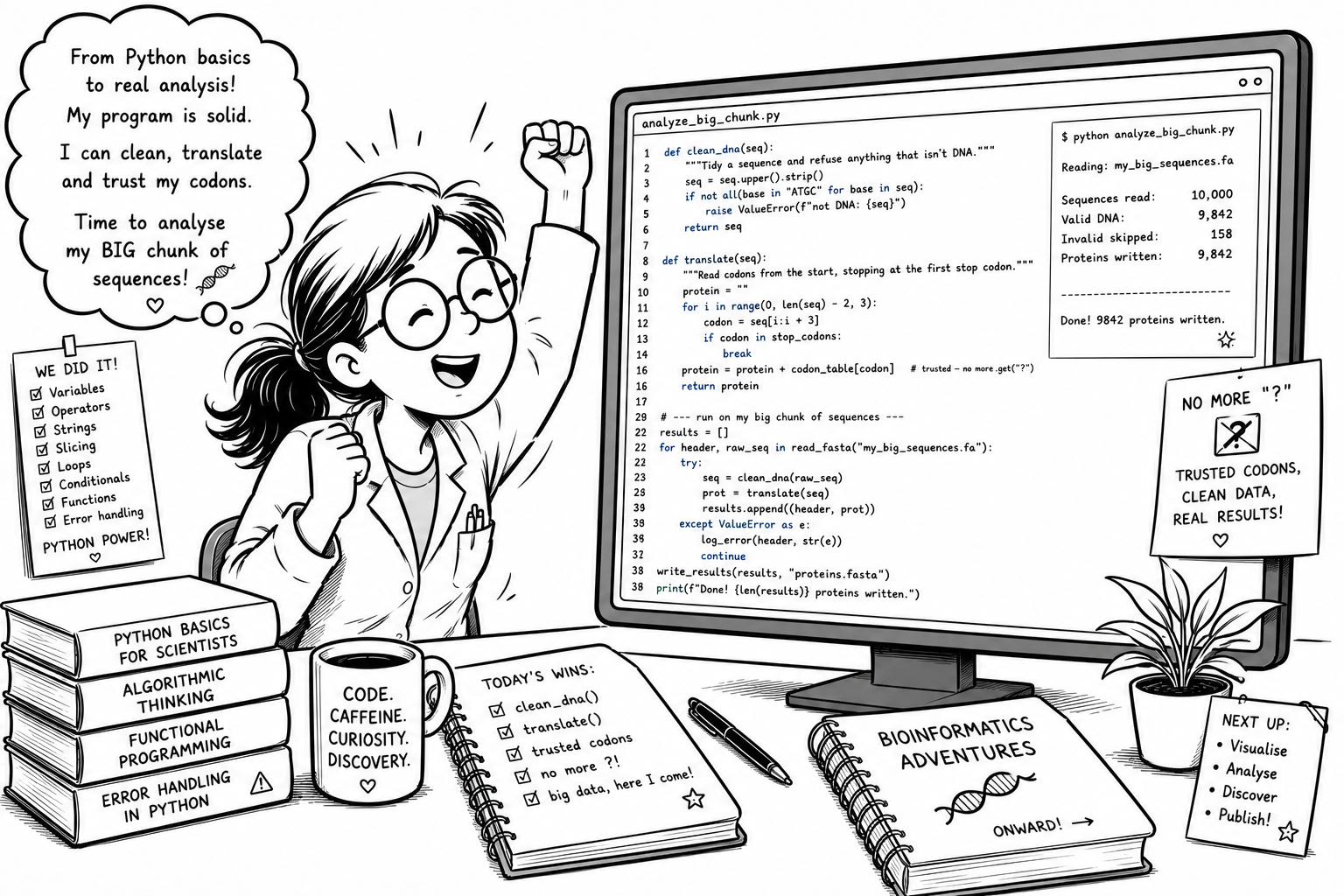
The complete ORF translator — clean, translate, and run the whole folder in one go:
Recap — Sessions 1–4
Four sessions ago a variable was a new word. You're leaving able to write a real, defensive bioinformatics program — one that reads a whole folder, translates every gene, and refuses the data it can't trust. That's not a beginner exercise. That's programming.
- ✓Variables & the four types
- ✓print(), f-strings, len(), round()
- ✓Arithmetic & the .count() method
- ✓Read an error, fix it yourself
- ✓Lists — hold a folder of sequences
- ✓Strings are sequences — slice out codons
- ✓.upper() · .replace() · .find()
- ✓Dictionaries — the codon table
- ✓for loops & the accumulator
- ✓if / elif / else — decide
- ✓range() + slicing to carve codons
- ✓break — stop at the first stop codon
- ✓Break a job into steps (an algorithm)
- ✓def — name it once, reuse it anywhere
- ✓raise — fail loudly on bad data
- ✓try / except — skip, don’t crash
You now have the basic skills to write Python Code
Every program you wrote had the same shape: a list of things → do the same job to each → handle the odd broken one. That shape has nothing to do with sequences. Point it at anything you'd otherwise do by hand.
Rename 800 files from their metadata, or pull the cell count out of every one — while you get a coffee.
A plate reader dumps 384 wells. The same OD or ΔΔCt calculation, applied to every row, in a second.
Twelve spreadsheets, twelve layouts. Read each, clean it, flag the rows that don't add up, stack them into one.
Lay out a 96-well plate, generate primer names, or work out a whole rack of dilutions — no arithmetic by hand.
Your turn to think: what do you do more than ten times a week? If you can write down the steps, you can now automate them. That's the real skill you just learned — sequences were only the excuse.
What's Next — From Writing Code to Using It
So far you've written every line yourself — that's how you learn what the machine is really doing. Real data science is the opposite: you stand on libraries other people wrote, and your job is to read them, trust the right ones, and glue them together.
- ▸Read and use other people’s code — libraries & documentation
- ▸pandas — real data tables (the spreadsheet, in Python)
- ▸matplotlib — turn a column of numbers into a figure
- ▸scipy — the statistics to back up what the figure shows
Everything you just learned still applies — a DataFrame is a container you loop over, a plot is a function you call, a bad row is data you have to handle. You're not starting over. You're scaling up.
- →Re-open the Colab and rebuild the translator from a blank cell
- →Feed it a messy sequence — check it refuses, loudly
- →Half an hour of practice beats re-watching the lecture
See you in Part 2!